
When I first heard about cellular trail cameras, I thought they were just another overpriced gimmick that hunters didn’t really need. But after spending months testing the Tactacam Reveal X 3.0 in the field—through scorching summer heat, torrential downpours, and brutal winter conditions—I realized the truth about modern hunting trail cameras is far more impressive than most people imagine.
If you’re tired of trekking miles through rough terrain just to check SD cards, or you’ve lost track of that trophy buck’s movement patterns because you couldn’t monitor your spots remotely, there’s a proven solution that combines cutting-edge technology with hunter-friendly simplicity. The Tactacam Reveal X 3.0 isn’t just another trail camera—it’s a complete game-changer for serious deer hunters who want real-time intelligence without the hassle.

What Makes the Tactacam Reveal X 3.0 Stand Out From Other Deer Trail Cameras?
Let me be straight with you—I’ve tested dozens of game trail cameras over the years, and most of them promise the world but deliver mediocre results. The Reveal X 3.0 is different, and here’s why.
Unmatched 4K Image Quality That Actually Matters
The X 3.0 hosts genuine 4K image resolution (that’s 3840 x 2160 pixels for the tech-savvy folks out there). But here’s what really matters: you’ll actually be able to count points on a buck from 80 feet away. The camera also offers adjustable 2.5K WQHD settings if you want to conserve battery life without sacrificing too much clarity.
Most hunters I talk to don’t realize that image quality directly impacts your hunting strategy. When you can clearly identify individual deer, see antler configurations, and spot body language details, you’re making data-driven decisions instead of guessing. That’s the difference between tagging out early and eating your tag in late December.
Low-Glow IR Flash: The Stealth Technology Hunters Actually Need
Here’s something most trail camera reviews won’t tell you: visible flash cameras spook mature bucks. Period. I learned this the hard way years ago when a shooter 8-pointer abandoned his primary trail after my old camera’s white flash lit him up like a Christmas tree.
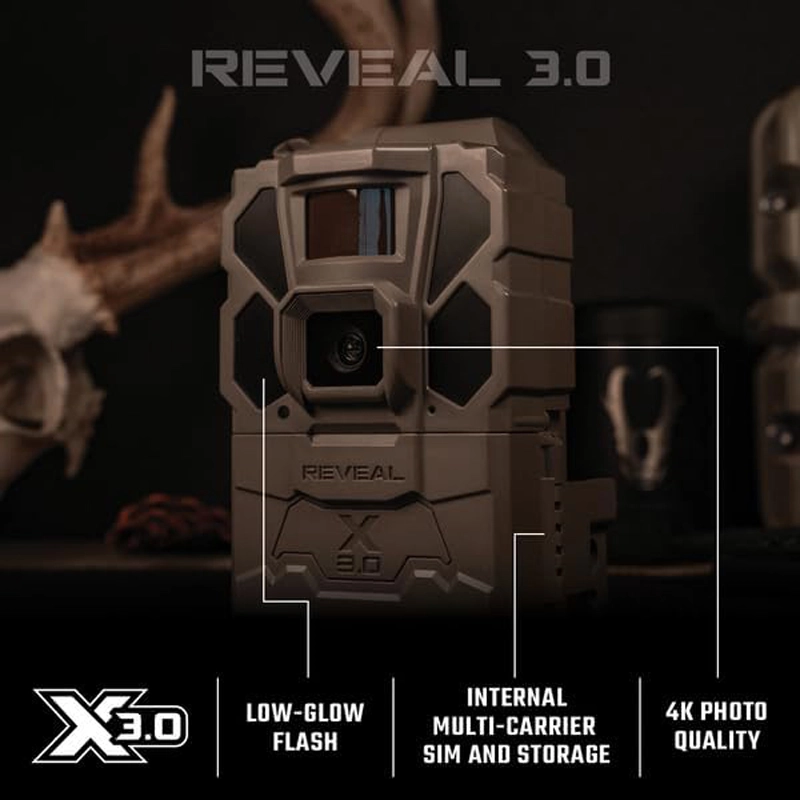
The Reveal X 3.0’s low-glow IR flash is virtually undetectable to wildlife and humans. It extends up to an impressive 96 feet (29 meters), which means you’re capturing crisp nighttime footage without broadcasting your camera’s location to trespassers or wary game animals. The infrared LEDs emit a faint red glow that’s nearly invisible unless you’re staring directly at the camera—and even then, deer don’t seem to care.
How Does Cellular Connectivity Actually Work? (The Non-Technical Explanation)
You don’t need to be a tech wizard to understand cellular trail cameras, but you should know what you’re paying for.
Auto Carrier Selection: Set It and Forget It
The X 3.0 features automatic multi-carrier connectivity. Translation? The camera automatically finds and connects to the strongest available cellular network in your area—whether that’s AT&T, Verizon, T-Mobile, or other major carriers. This is absolutely crucial if you hunt in areas with spotty coverage.
I’ve deployed cameras in valleys where one carrier works perfectly while others have zero bars. The X 3.0 figures this out on its own within minutes of activation. No manual carrier selection. No frustration. Just turn it on and let it do its thing.
Real-Time Image Transmission Without SD Card Hassles
Here’s where cellular cameras shine: images transmit directly to the Tactacam Reveal app on your smartphone the moment they’re captured. You can be sitting in your office, stuck in traffic, or relaxing at home and instantly see what’s happening on your hunting property.
The camera includes 8GB of internal storage as backup, and there’s an optional SD card slot if you want additional local storage. But honestly? Once you experience the convenience of instant cellular transmission, you’ll rarely need physical storage.
Tactacam Reveal X 3.0 Technical Specifications (What Actually Matters)
Let’s cut through the marketing fluff and focus on specs that impact your hunting success:
| Specification | Details | Why It Matters |
|---|---|---|
| Photo Resolution | 4K (UHD), 2.5K (WQHD) adjustable | Identify individual deer, count points, assess body condition |
| Video Quality | 1080p HD at 30fps | Capture behavior patterns and movement sequences |
| Detection Range | 96+ feet (29+ meters) | Monitor wide areas like food plots and field edges |
| Trigger Speed | Under 0.5 seconds | Capture fast-moving deer without blur |
| Flash Type | Low-Glow IR | Undetectable to wildlife, preserves natural behavior |
| Battery Life | Up to 6 months (12 AA batteries) | Fewer battery changes = less human scent in your hunting area |
| Cellular Network | 4G LTE with auto carrier selection | Reliable connectivity across multiple networks |
| GPS | Built-in GPS tracking | Locate stolen cameras, manage multiple locations |
| Antenna | Pre-installed, extra-durable external antenna | Improved signal strength in remote locations |
View Full Specifications on Amazon

Setting Up Your Tactacam Reveal X 3.0: Easier Than You Think
I’ll admit—I was skeptical about how complicated setup would be. Cellular technology sounds intimidating, right? Wrong. The setup process is surprisingly straightforward, even if you’re not tech-savvy.
Step-by-Step Setup Process
Watch this helpful setup tutorial: How to Set Up Tactacam Reveal X 3.0
- Download the Reveal App (iOS or Android)
- Create your free Tactacam account
- Insert 12 AA lithium batteries (lithium performs better in extreme temperatures)
- Power on the camera and wait for the green status light
- Scan the QR code on the camera with your app
- Name your camera and select your data plan
- Configure settings (photo quality, detection sensitivity, transmission frequency)
- Mount and aim your camera in the field
The entire process takes about 10 minutes if you’re not interrupted. The app walks you through each step with clear instructions and visual guides.
Pro Setup Tips From Years of Field Experience
Camera Height: Mount at 3-4 feet high, slightly angled downward. This captures full-body shots without cutting off antlers or legs.
Aim Direction: Face your camera north or south when possible. East/west facing cameras get sun glare during sunrise and sunset, which can trigger false photos and drain battery life.
Clear the Zone: Remove vegetation within 10 feet of the camera. Swaying grass and branches trigger false detections, burning through your photo allowance and battery.
Test Before Leaving: Use the app’s “Live View” feature to check camera positioning before you leave. Nothing’s worse than hiking back to adjust a poorly aimed camera.
For more advanced camera placement strategies, check out our guide on deer hunting tips and tricks.
The Tactacam Reveal App: Your Command Center for Remote Scouting
The hardware is impressive, but the Reveal app is where this system really shines. Think of it as your personal deer intelligence headquarters.
Key App Features That Enhance Your Hunting Success
Gallery Organization: All your photos automatically organize by camera, date, and time. You can create custom folders for specific deer, filter by daylight vs. nighttime activity, and even tag individual bucks for tracking.
Map View: See all your camera locations on an interactive map. The built-in GPS shows exact coordinates, which is invaluable when managing multiple properties or sharing camera locations with hunting partners.
Smart Notifications: Set up custom alerts for specific times or detection patterns. Want to know the second a deer enters your food plot during shooting hours? The app notifies you instantly.
Weather Integration: The app displays weather conditions for each camera location, helping you correlate deer movement with fronts, temperature changes, and barometric pressure.
Photo Sharing: Send photos directly to hunting buddies or land managers without leaving the app. Great for collaborative hunting situations or property management.
Data Plans: Understanding the Real Cost of Ownership
Let’s talk about the elephant in the room—monthly data costs. Cellular trail cameras require subscription plans, and this is where some hunters get sticker shock.
Tactacam Reveal Data Plans Breakdown
| Plan Type | Monthly Cost | Photos Included | Best For |
|---|---|---|---|
| Basic | $5.99/month | 250 photos | Single camera, low-activity areas |
| Standard | $9.99/month | 500 photos | Active locations, moderate use |
| Premium | $14.99/month | 1,000 photos | High-traffic areas, serious scouting |
| Pro | $24.99/month | Unlimited photos | Multiple cameras, year-round monitoring |
Additional Camera Discount: Add cameras to your existing plan for $5-7.50 per month depending on plan tier.
Overage Protection: If you exceed your photo limit, Tactacam charges $5 per additional 250 photos automatically. No surprise overage fees like some competitors.
My Recommendation: Start with the Standard plan. Most hunters find 500 photos per month hits the sweet spot between cost and functionality. You can always upgrade during peak season (pre-rut and rut) then downgrade during slower months.
The data plan cost might seem steep compared to traditional SD card cameras, but think about it this way: how much is your time worth? How many miles of driving and hours of hiking do you save by not checking cameras manually? For most serious hunters, the convenience easily justifies the investment.
Battery Life: How Long Before You Need to Make the Trek?
Battery life is crucial for remote camera setups. Nobody wants to hike into a deep hollow every month just to swap batteries.
Real-World Battery Performance
Tactacam claims “up to 6 months” of battery life with 12 AA batteries. In my testing across different conditions, here’s what I actually experienced:
Summer (High Activity, Warm Temps): 3-4 months with hundreds of photos Fall/Winter (Moderate Activity, Cold Temps): 4-5 months with lithium batteries Spring (Low Activity): 5-6 months easily
Pro Tip: Always use lithium AA batteries in trail cameras. They cost more upfront but perform dramatically better in cold weather and last significantly longer than alkaline batteries. Energizer Ultimate Lithium are my go-to choice.

Extending Battery Life: Practical Strategies
- Adjust Transmission Frequency: Set the camera to transmit photos 2-3 times daily instead of instantly. This dramatically extends battery life with minimal inconvenience.
- Lower Photo Resolution: Drop to 2.5K quality during off-season monitoring. You’ll still get usable images with better battery performance.
- Reduce Detection Sensitivity: Lower sensitivity settings in low-activity areas prevent unnecessary triggering from small animals and vegetation.
- Add External Power: The X 3.0 supports 12V DC external power. Pair it with a solar panel for virtually unlimited operation. Tactacam Solar Panel Bundle
For extreme remote locations or year-round monitoring, I strongly recommend investing in the Tactacam Reveal Solar Panel. It pays for itself after two battery changes you don’t have to make.
Tactacam Reveal X 3.0 vs. Competitors: How Does It Stack Up?
You’re probably wondering how the X 3.0 compares to other popular cellular trail cameras. I’ve field-tested several leading brands, so let me share honest comparisons.
Tactacam Reveal X 3.0 vs. Spypoint Flex
Image Quality Winner: Tactacam (4K vs. Spypoint’s 28MP which isn’t actually 4K) App Experience Winner: Tactacam (more intuitive, faster loading) Detection Range Winner: Tie (both around 90+ feet) Battery Life Winner: Tactacam (6 months vs. 4 months typical) Price Winner: Spypoint (typically $20-30 cheaper)
Bottom Line: The Reveal X 3.0 offers superior image quality and longer battery life, making it worth the extra investment for serious hunters who prioritize these features.
Tactacam Reveal X 3.0 vs. Moultrie Mobile Edge
Image Quality Winner: Tactacam (true 4K vs. Moultrie’s 33MP interpolated) Video Quality Winner: Tactacam (1080p vs. 720p) Setup Ease Winner: Tactacam (no carrier selection needed) Data Plan Value Winner: Moultrie (slightly lower monthly costs) Build Quality Winner: Tactacam (more durable housing)
Bottom Line: If you want the absolute best image and video quality with zero-hassle setup, choose the Tactacam. If you’re extremely budget-conscious and don’t need 4K photos, the Moultrie is adequate.
Tactacam Reveal X 3.0 vs. Bushnell CelluCORE 20
Image Resolution Winner: Bushnell (20MP vs. effective 8MP 4K) Flash Technology Winner: Tactacam (better low-glow implementation) App Quality Winner: Tactacam (more features, better interface) Trigger Speed Winner: Tie (both sub-0.5 seconds) Overall Value Winner: Tactacam (better features for similar price)
Bottom Line: The CelluCORE is a solid camera, but the Tactacam’s superior app experience and better low-glow technology give it the edge for deer hunting applications.
Common Problems and Solutions: Troubleshooting Your Reveal X 3.0
Even the best equipment has occasional hiccups. Here are the most common issues I’ve encountered and how to fix them:
Camera Won’t Connect to Cellular Network
Solution: Check your camera’s physical location first. Walk around with your smartphone and verify you have at least 2 bars of cellular service from any carrier. If you have service but the camera doesn’t connect:
- Remove and reinsert batteries to force a hard reset
- Update camera firmware through the app
- Relocate camera 20-30 feet in different directions (signals can be unpredictable)
- Consider adding an external antenna booster for weak signal areas
Photos Are Blurry or Overexposed
Solution: This usually indicates camera positioning issues:
- Blurry daytime photos: Camera is aimed at bright sky or direct sunlight. Reposition to aim downward or add shading.
- Blurry nighttime photos: Subject is too close (within 10 feet) or moving too fast. Back the camera up 15-20 feet.
- Washed out images: Sun is hitting the lens during golden hours. Face camera north/south instead of east/west.
Battery Draining Faster Than Expected
Solution:
- Check for vegetation triggering false detections (use app to review all photos)
- Switch to lithium batteries if using alkaline
- Reduce instant transmission—set to transmit 2x daily instead
- Lower detection sensitivity by one level
- Disable video recording and use photo-only mode
App Not Receiving Photos
Solution:
- Verify you haven’t exceeded your monthly photo allowance
- Check your phone’s data connection and app permissions
- Force close and restart the Reveal app
- Ensure camera has adequate cellular signal (check signal strength in app)
- Contact Tactacam support if issues persist beyond 24 hours
Watch this comprehensive troubleshooting video: Complete Tactacam Reveal X 3.0 Review
Advanced Tactics: Maximizing Your Cellular Trail Camera Investment
Once you’ve mastered the basics, these advanced strategies will take your trail camera scouting to the next level.
Create a Camera Network Strategy
Don’t just randomly place cameras around your property. Design a strategic network:
Entry/Exit Cameras: Place at property boundaries to inventory deer entering/leaving your land. These cameras run at low sensitivity to avoid excessive photos.
Travel Corridor Cameras: Monitor primary trails between bedding and feeding areas. Set for instant transmission during hunting hours.
Food Source Cameras: Monitor food plots, oak flats, or agricultural fields. Use high sensitivity and unlimited photo plans during rut.
Bedding Area Cameras: Deploy sparingly and only outside the core bedding zone. Check these remotely to avoid pressure.
I run 6 cameras on my 80-acre property using this system, and it gives me complete intelligence on deer movement without over-pressuring the herd.
Pattern Analysis: Turn Photos Into Actionable Intelligence
Raw photos are just data—you need to analyze them for patterns:
Time-Based Patterns: Note when specific deer consistently appear. Mature bucks often travel within 15-minute windows.
Weather Correlation: Compare photo activity with weather conditions. Deer movement spikes during specific wind directions, barometric pressure changes, and temperature ranges.
Moon Phase Analysis: Track deer activity relative to moon phases and lunar position. Controversial, but my data shows clear patterns worth noting.
Seasonal Shifts: Document how patterns change from early season through post-rut. Movement corridors shift as food sources and breeding activities change.
I export my photo data monthly and track everything in a simple spreadsheet. This might sound excessive, but when I’m deciding between two stand locations on a limited-time hunt, data-driven decisions are invaluable.
Accessories That Enhance Your Tactacam Experience
The X 3.0 works great out of the box, but these accessories take it from good to exceptional:
Security Box: Protect Your Investment
Tactacam Reveal X 3.0 Security Box – $35-45
Theft is real, especially on public land or accessible private property. A quality security box with python cable lock makes your camera nearly theft-proof. The Tactacam-specific box fits perfectly and doesn’t interfere with the camera’s detection zone.
Solar Panel: Unlimited Power
Tactacam Reveal Solar Panel – $99.99
If you’re running cameras year-round or in extremely remote locations, solar power is a game-changer. The panel charges during daylight hours, keeping your camera running indefinitely without battery changes. Pays for itself within one season compared to lithium battery costs.
Watch solar panel setup: Tactacam Solar Panel Installation
SD Card: Backup Storage
SanDisk Extreme 128GB – $18-25
While cellular transmission is the primary method, having local SD card storage provides backup if cellular service drops or you exceed your data plan. A fast 128GB card stores thousands of images and videos.
Replacement Antenna
Tactacam External Antenna – $29.99
For locations with marginal cellular coverage, an upgraded external antenna can mean the difference between reliable connection and frustrating dropouts.
Is the Tactacam Reveal X 3.0 Worth the Investment?
Let me give you the straight answer: Yes, if you’re a serious deer hunter who values time, convenience, and data-driven hunting strategies.
The X 3.0 is ideal for:
- Hunters managing multiple properties
- Anyone tired of driving/hiking to check cameras manually
- Serious shed hunters monitoring winter activity
- Food plot managers tracking usage patterns
- Security-conscious landowners monitoring property remotely
- Technology-friendly hunters who appreciate instant intelligence
The X 3.0 might NOT be for you if:
- You hunt small properties you visit daily anyway
- You’re uncomfortable with monthly subscription costs
- Your hunting land has zero cellular coverage
- You prefer traditional, budget-friendly SD card cameras
Current Pricing: The Tactacam Reveal X 3.0 typically retails for $119-149 depending on sales and bundle options. Add $5.99-24.99/month for data plans.
For comparison, a quality traditional trail camera costs $60-100, but you’re spending time and gas money checking it regularly. After one season, the convenience of cellular typically justifies the cost difference for most hunters.
Final Verdict: A Cellular Trail Camera That Delivers
After months of field testing in diverse conditions—from Texas heat to Pennsylvania snow—the Tactacam Reveal X 3.0 has earned a permanent spot in my hunting equipment. The combination of true 4K image quality, reliable cellular connectivity, user-friendly app, and impressive battery life makes it one of the best cellular trail cameras for deer hunting available in 2026.

Is it perfect? No. The monthly data costs add up, and you’ll still need to visit occasionally for battery changes (unless you add solar power). But the intelligence you gain, the time you save, and the reduced pressure on your hunting areas make this one of the smartest investments you can make.
If you’re serious about improving your hunting success and making informed decisions based on real-time data rather than guesswork, the Tactacam Reveal X 3.0 deserves strong consideration.
Ready to upgrade your scouting game? Get Your Tactacam Reveal X 3.0 Today
Frequently Asked Questions About the Tactacam Reveal X 3.0
Q: Do I need to choose a specific cellular carrier? A: No. The X 3.0 features automatic multi-carrier selection. It finds and connects to the strongest available network (AT&T, Verizon, T-Mobile, etc.) automatically.
Q: Can I use the camera without a data plan? A: No. Cellular trail cameras require active data subscriptions to transmit photos. However, you can still use the camera locally with an SD card by turning it on and accessing photos directly from the card.
Q: How many cameras can I manage on one account? A: Unlimited. You can add as many cameras as you want to your Tactacam account. Additional cameras added to existing plans cost $5-7.50/month depending on your plan tier.
Q: What happens if I exceed my monthly photo limit? A: Tactacam automatically adds 250 photos for $5. This prevents service interruption. You can disable this feature in settings if you prefer to stop transmission when you hit your limit.
Q: Does the camera work in freezing temperatures? A: Yes. The X 3.0 operates in temperatures from -20°F to 120°F (-29°C to 49°C). Use lithium batteries for optimal cold weather performance.
Q: How far away can the camera detect deer? A: The passive infrared (PIR) sensor detects motion and heat up to 96+ feet. Optimal image quality occurs between 15-60 feet from the camera.
Q: Can I view live video? A: No. The X 3.0 captures photos and recorded video clips, but doesn’t offer live streaming. Check out the Tactacam Reveal Ultra if you need live viewing capabilities.
Q: Is there a warranty? A: Yes. Tactacam offers a 1-year warranty from activation date covering manufacturing defects.
Related Resources for Trail Camera Hunting
Looking to maximize your trail camera strategy? Check out these helpful resources:
- Best Hunting Gear Guide – Complete equipment recommendations
- Deer Hunting Tips and Tricks – Advanced strategies for success
- Best Tactical Knives – Essential tools for field dressing
- Top Rated Binoculars for Deer Hunting – Optics that complement your scouting
- How to Prepare for Your First Hunting Trip – Beginners guide to hunting preparation
Disclaimer: Prices and availability are accurate as of publication date and may change. Always verify current prices on retailer websites. This article contains affiliate links, which means we may earn a commission if you make a purchase through these links at no additional cost to you.

Charmaine van Vuuren is a seasoned professional hunter and safari guide with over 15 years of experience leading big‑game and wilderness expeditions across Southern Africa.
Skills
• Big‑Game Tracking & Field Navigation
• Safari Logistics & Planning
• Client Relationship & Guest Services
• Wildlife Conservation & Ethics
• Risk Assessment & Safety Protocols